Most LinkedIn videos fail before anyone presses play.
Not because the message is bad. Not because the visuals are weak. But because the size, shape, format, and upload settings are wrong.
LinkedIn has rules. Unwritten ones, technical ones, algorithm ones. If your video doesn’t fit inside them, it gets cropped, blurred, slowed, muted, ignored, or just never pushed in the feed.
People blame content. The real problem? Wrong LinkedIn video size.
Prolific Studio has produced animated explainers, 2D animation services, 3D animation services, motion-led brand stories, and campaign videos for companies that want more than views. They want results. And the first step to results is getting the basics right.
This guide strips the guesswork. No heavy words. No filler. No complicated tech talk. Just the simplest, smartest breakdown of LinkedIn video size, specs, formats, do’s, don’ts, and upload rules so your video doesn’t flop before launch.
[elementor-template id=”13845″]
Facts About LinkedIn Video Size
These are the non-negotiables of LinkedIn video specifications:
- Best format: MP4
- Max upload size (Posts): 5GB
- Max upload size (Ads): 500MB
- Min upload size: 75KB
- Max length (Posts): 15 minutes
- Max length (Ads): 30 minutes
- Min length (All videos): 3 seconds
- Ideal frame rate: Under 30 FPS
- Best codec: H.264
- Audio requirement: AAC or MPEG4 under 64KHz
- Autoplay default: Muted
Sounds basic. Yet 7 out of 10 uploaded videos still violate one of these.
Why LinkedIn Video Size Matters More Than Video Script
A great script in the wrong video size is like a fire billboard hidden in a basement.
It can’t compete. It can’t perform. It can’t convert.
Here’s what happens when sizes are off:
- The video gets black bars on the sides
- Text gets cut from the edges
- Visuals look pixelated
- Upload slows down
- Playback lags
- Viewers scroll away before 2 seconds
LinkedIn gives priority to native videos that fit platform specs. Not the most creative ones. Not the most expensive ones. The correctly sized ones.
A lot of brands spend on a video marketing strategy but skip the fundamentals. That’s the silent reason campaigns die early.
LinkedIn Video Dimensions
Best LinkedIn video aspect ratio specs
Here are the sizes that consistently perform:
- 16:9 Landscape → 1920 x 1080 (Good for storytelling, interviews)
- 1:1 Square → 1080 x 1080 (Balanced, safe, clean look)
- 4:5 Vertical → 1080 x 1350 (Best for ads + mobile feeds)
- 9:16 Full Vertical → 1080 x 1920 (Tall, TikTok-style, bold)
Now the pro tip:
Most LinkedIn users scroll on phones. Tall video takes more screen space. More screen space = more attention, more stops, more clicks.
So if your video is for reach and reaction, 4:5 is your friend.
LinkedIn Video Specs for Posts vs Ads
LinkedIn video specs for posts
- Max length: 15 minutes
- Max size: 5GB
- Can be uploaded from desktop or mobile
- Can include captions (SRT file)
- Supports MP4, MOV (but MP4 recommended)
LinkedIn video specs for ads
- Max length: 30 minutes
- Max size: 500MB
- Must be uploaded from Campaign Manager (desktop only)
- Must be MP4
- Recommended length: 15–30 seconds
- Short videos under 30s auto-loop until 30s total playback
Ads don’t need to be long. They only need to hit hard in the first 3 seconds.
LinkedIn Video Upload Specs You Must Check Before Posting

File format rules
- MP4 = safest, smoothest, accepted everywhere
- H.264 codec = LinkedIn’s favorite
- Don’t use: AVI, ProRes, or weird file exports
You can create the best 2D animation services masterpiece or a killer sizzle reels concept, but if it’s not in MP4, LinkedIn may reject it or compress it to dust.
LinkedIn Video Length Specs: What Works vs What’s Allowed
Allowed is NOT the same as recommended. Yes, you can upload 15-minute videos. No, you shouldn’t unless the value curve is unreal.
Here’s what works better:
- 6–12 seconds → Quick hooks, logo reveals, teasers
- 15–30 seconds → Highest ad performance range
- 45–90 seconds → Story-led content
- 2–5 minutes → Tutorials and explainers (if engaging)
- 10+ minutes → Only for very strong audiences
Most videos fail because they try to explain everything. Winning videos explain one thing well.
LinkedIn Native Video Requirements That Keep You Feed-Friendly
Native video = uploaded directly into LinkedIn, not shared as a link.
Native videos:
- Autoplay in feed
- Get prioritized by the algorithm
- Keep users on the platform
- Deliver more views than YouTube/Vimeo links
If you post a YouTube link, LinkedIn basically whispers your video into a closet.
LinkedIn Video Specs Mobile vs Desktop
How videos behave on mobile
- Taller videos win more attention
- Captions matter more (sound is often off)
- Text has to be bigger, bolder, and centered
- Thumbnails must make sense even at small sizes
How videos behave on desktop
- Landscape looks fine here
- But still takes less screen space than vertical
- Captions still recommended
Mobile-first is not just a trend. It’s the default now.
LinkedIn Video Autoplay Muted Specs
Your video starts on mute every time. No exceptions. No surprise audio. No dramatic music intros are saving you.
This means:
- The message must make sense without sound
- On-screen text is not optional
- Captions increase completion rates
- The first frame must explain the value fast
Brands assume people will turn on audio. Most don’t.
LinkedIn Video Caption Requirements
Captions aren’t a bonus. They’re part of the video now.
Accepted format: SRT file
Must include: Plain text only
No emojis, colors, styling, or fonts inside SRT files.
Captions help:
- People who scroll silently
- Non-native English readers
- Auto-translation
- Engagement time
- Watch completion
Even 2 extra seconds of watch time raises visibility.
Infographic, Animation, and Concept Videos on LinkedIn

(And Why They Work So Well)
How to make infographic videos that perform on LinkedIn
Infographics win because they:
- Deliver fast information
- Don’t rely on sound
- Work great with bold text
- Hook viewers quickly
Keep scenes 2–3 seconds max. Show facts in 5–7 words per line. Use motion to guide eyes, not distract.
2D animation services vs 3D animation services: Which performs better?
Both perform well if sized right.
2D animation = faster to produce, cleaner for text, great for explainers
3D animation = higher visual impact, better for products, more immersive
LinkedIn doesn’t favor 2D or 3D. LinkedIn favors the correct size + strong hook.
What is concept art and why it works in LinkedIn videos
Concept art sets a tone before production. It makes your idea look premium before the final video exists. Brands use it to test engagement before full animation.
What are sizzle reels, and why LinkedIn loves them
Sizzle reels are short, punchy, energy-packed videos. Fast cuts. Big moments. Music momentum (that works muted too). Think highlight reel, not full story.
Perfect for LinkedIn ad campaigns.
LinkedIn Thumbnail Size & Why It Lowkey Decides Your Click-Through Rate
You can do everything right and still lose views if your thumbnail screams “skip me.” People scroll fast. They judge faster.
LinkedIn thumbnail optimal size: 1280 x 720 (16:9)
File types supported: JPG, PNG, GIF (static works better)
A perfect LinkedIn thumbnail should:
- Have bold readable text (3–5 words max)
- Show a human face or strong visual hook
- Avoid clutter like long sentences or logos alone
- Still make sense without sound or captions
- Use high contrast (dark/light separation)
What not to do:
- Adding tiny text nobody can read
- Using a random frame from the video
- Making the design logo-heavy
- Overstuffing information
A thumbnail is not decoration. It’s a conversion door to your video.
LinkedIn Video Cover Frame vs Custom Thumbnail
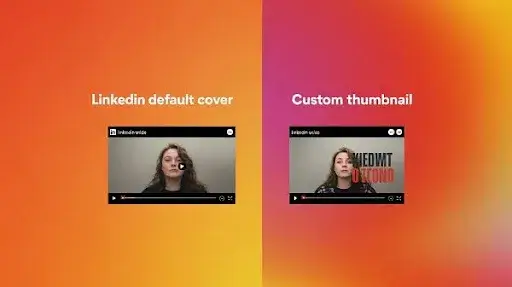
LinkedIn gives you 2 options:
- Select a frame from the video
- Upload a custom thumbnail
Let’s make it simple:
| Option | Works Best When |
| Video frame | The video already starts with a strong visual first frame |
| Custom thumbnail | You need to control messaging, hook, or readability |
99% of brands do better with a custom thumbnail. Video frames are rarely intentional, readable, or persuasive.
LinkedIn Video Hook Strategy (Because Size Alone Won’t Save You)
Getting the correct LinkedIn video size makes you eligible to get views. The hook makes you worthy of views.
Your first 2.5 seconds must achieve one of these:
- Make them curious
- Make them nod (relatable)
- Make them feel smart
- Make them challenge a belief
- Make them want the outcome you’re promising
- Make them stop scrolling without thinking
Weak hook:
“Welcome to our video about supply chain solutions.”
Stronger hook:
“Your supply chain is leaking money here—let’s fix it in 20 seconds.”
Hook rule:
Clarity beats creativity in the first 3 seconds.
You can get fancy later.
LinkedIn Video Text Overlay Rules That Increase Engagement
Since LinkedIn autoplays videos muted, your text is doing 80% of the talking.
Best practices:
- 6–8 words per line (max)
- Big enough to read on mobile
- Center-aligned or left-aligned (never stretched edge to edge)
- Use sentence case (NOT ALL CAPS)
- No paragraph blocks
- One idea per frame
If your text looks like a paragraph, it feels like work. And people don’t want to work while scrolling.
Why 2D Animation Services Perform So Strongly on LinkedIn
2D animation works unusually well on LinkedIn because:
- Text is easy to integrate naturally
- The message stays clear even without sound
- Complex topics feel less intimidating
- Motion keeps retention high
- Visuals don’t overwhelm the message
Brands that need to simplify ideas, software, automation, finance, logistics, and healthcare tend to get stronger results with 2D animation services because clarity is the hero, not visual noise.
When 3D Animation Services Win on LinkedIn
3D dominates when:
- The product must look premium
- You’re showcasing an object, machine, or physical space
- The visual experience itself is the selling point
- Real filming is too expensive or not possible
- You need depth, realism, and cinematic effect
The key difference?
2D animation services = message first
3D animation services = experience first
If you match the format to the objective, both crush it.
Sizzle Reels Concept for LinkedIn
Sizzle reels are short adrenaline shots for the LinkedIn feed. They’re not stories. Their statements.
A strong sizzle reel structure:
- 0–1.5 sec → Pattern interrupt / visual punch
- 1.5–3 sec → Big claim or emotional hook
- 3–8 sec → Fast proof snapshots
- 8–12 sec → Momentum + authority signals
- 12–15 sec → Call to action or payoff line
Sizzle reels win when they feel:
- Fast but not chaotic
- Premium but not overproduced
- Bold but not vague
- Energetic, even on mute
Music helps, but never carries the video. The edit carries it.
The LinkedIn Algorithm Doesn’t Boost the Best Video… It Boosts the Most Compatible One
People spend years trying to “beat the algorithm.” The algorithm is not a boss fight. It’s a storage system. It simply pushes videos that:
- Keep users on the platform
- Get fast, early engagement
- Play smoothly without lag
- Don’t require sound to make sense
- Fit the correct LinkedIn video size and specs
- Get above-average watch completion rates
- Generate meaningful interactions (not just likes)
Your job isn’t to hack it. Your job is to cooperate with it.
LinkedIn Video Posting Checklist (Use This Before You Hit Upload)
Before uploading, confirm:
- MP4 format
- H.264 codec
- Correct aspect ratio (4:5 preferred)
- File size under limits
- Subtitles added (SRT)
- First 3 seconds are scroll-stopping
- Text is readable on mobile
- Thumbnail is intentional, not random
- Video makes sense on mute
- No critical graphics in corner edges
- Strong CTA in caption or end screen
If even one is missing, the video is performing at 60–80% capacity max. Fixing basics often doubles results.
Posting Time, Caption, and Hashtag Strategy (Short & Effective)
- Post when your audience is active (usually Tue–Thu, 10am–3pm local time)
- Add a 2–4 line caption hook before the “see more”
- Use 3–5 targeted hashtags, not 20 random ones
- Tag people and brands only when relevant (don’t spam tag)
Example caption starter:
“Most LinkedIn videos fail in 2 seconds. Here’s why—and how to fix it in under 30.”
Short. Straight. Curiosity-driven.
Frequently Asked Questions
Should I prioritize 2D animation services or 3D animation services for LinkedIn?
Choose 2D animation services if your goal is clarity and messaging. Choose 3D animation services if showcasing a product or visual experience is the priority.
Why do my LinkedIn videos get low views even when the content is good?
Usually due to incorrect video size, poor hooks, lack of captions, or videos that don’t make sense while muted.
What is the ideal length for LinkedIn videos?
15–30 seconds performs best for ads and general engagement. 45–90 seconds works for storytelling if engaging from the start.
Do thumbnails matter on LinkedIn videos?
More than people realize. A strong custom thumbnail increases click-through rate significantly compared to random video frames.
Are sizzle reels effective for LinkedIn marketing?
Yes. If fast, hook-heavy, and formatted for silent viewing, a strong sizzle reels concept can outperform long-form content easily.
Final Words
Most LinkedIn video guides tell you what to upload. This one tells you what will actually work. Because views don’t come from luck. They come from compatibility, size, structure, silence-proofing, and psychology.
Get the specs right. Make it mobile-first. Hook fast. Explain fast. Deliver fast. Do that, and LinkedIn stops being a guessing game. It becomes a growth engine.
So, what are you waiting for? Get in touch with a video animation and production company today.
Related Articles: